The challenge
One server was still standing after the migration.
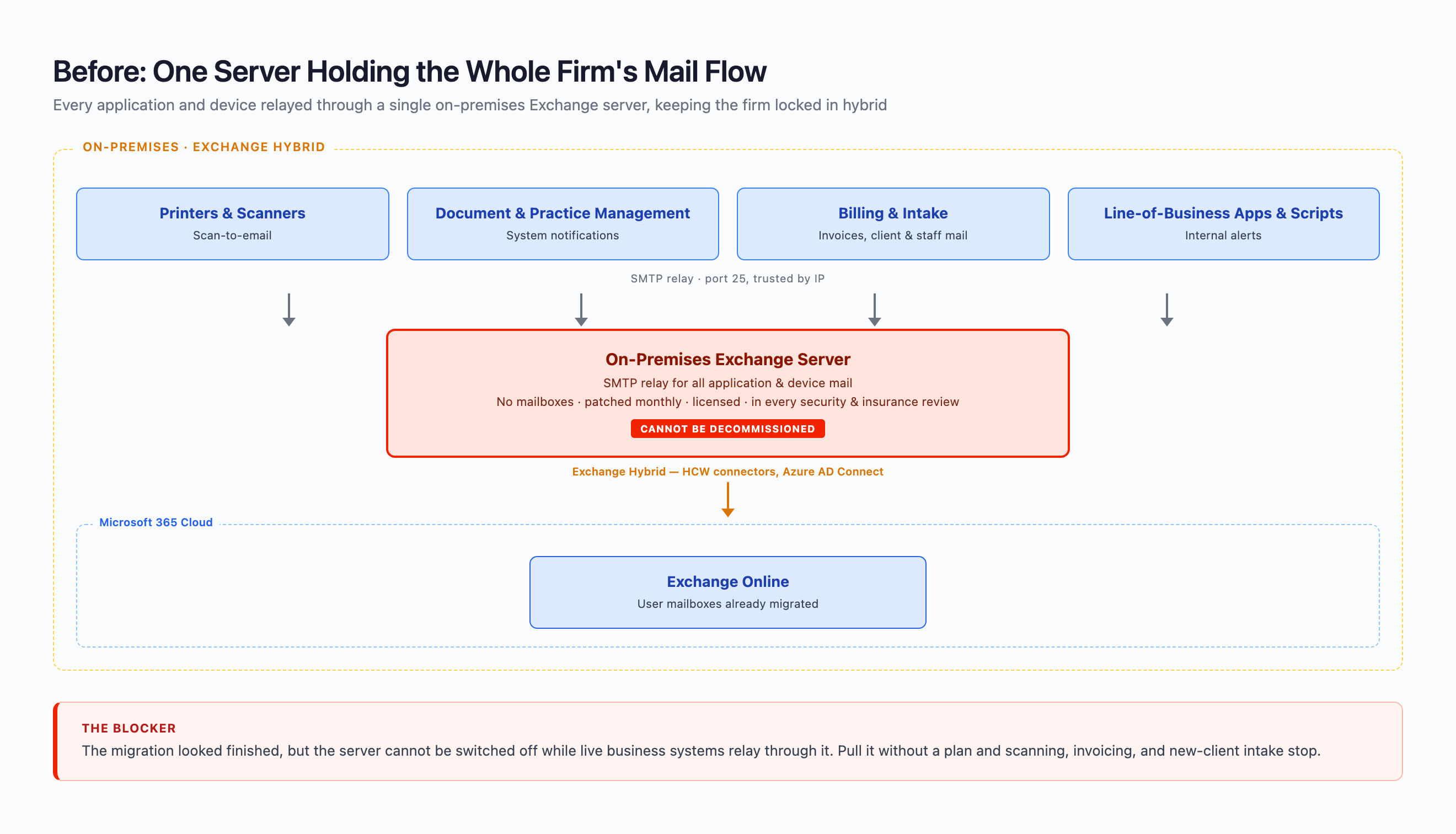
The firm had already moved its mailboxes to Exchange Online and signed off the migration. A single on-premises Exchange server was still running, still patched every month, still consuming a Windows Server and Exchange licence, and still appearing in every security review and cyber-insurance questionnaire the firm completed.
That carried real risk. On-premises Exchange has been the target of some of the most serious exploits of the last few years, including ProxyLogon and ProxyShell, and an internet-reachable mail server that routes privileged client communication is exactly the kind of asset a firm wants gone once it no longer needs it.
The technical reason it could not be switched off
The server was still acting as an SMTP relay. Across the firm, systems sent mail through it instead of through a mailbox:
- Multifunction printers and scanners using scan-to-email
- The document management and practice / matter management systems sending notifications
- Time, billing, and intake applications emailing both staff and clients
- Internal line-of-business tools and scripts
Some of that mail stayed inside the firm; some of it went out to clients, courts, and opposing counsel. Microsoft's own guidance is to remove on-premises Exchange once mailboxes are migrated, and hybrid was never designed to be a permanent home. You cannot decommission a relay while live business systems depend on it, and switching it off without a plan would have stopped scanning, invoicing, and new-client intake. Every one of those mail streams needed a new, supported home before the server could go.
Our approach
BITSUMMIT re-homed each mail stream onto a supported Microsoft service before touching the hybrid configuration, starting from the data on what the relay was actually carrying.
1. Map every connection the server carried, and how it authenticated
Using message-tracking, SMTP protocol, HttpProxy (IIS), and Windows Security logs, BITSUMMIT inventoried every connection still touching the server, not just SMTP relay, working from what the server was actually doing rather than from out-of-date documentation. Each connection type was catalogued with the way it authenticated, so nothing was retired on assumption:
- Anonymous SMTP relay: internal apps, servers, and scanners submitting unauthenticated and trusted by source IP - the busiest inbound path, spread across a long list of distinct IP addresses
- Authenticated SMTP submission: applications already signing in to send
- Hybrid send connectors: outbound mail to Office 365, confirming the Exchange-hybrid coexistence
- Direct outbound delivery: application mail going straight out to external recipients
- Legacy authentication: Basic and NTLM still present on the connectors and endpoints the server exposed, both deprecated and relay-prone
- Monitoring noise: Managed Availability health probes and WMI monitoring, excluded so it did not distort the picture of who was really sending
Every real mail stream was then sorted by destination, internal recipients versus external, which decided where each one would go next.
2. Match each sender to the right Exchange Online send path
Once mailboxes are in Exchange Online, Microsoft supports a small set of ways for apps and devices to send, each with its own endpoint, authentication, and limits. Rather than force everything down one path, BITSUMMIT matched each sender to the best fit:
- Direct Send (tenant MX endpoint, port 25, no mailbox) for simple internal-only devices such as printers and scanners
- Microsoft 365 High Volume Email (HVE) (port 587, authenticated HVE account) for high-volume internal and transactional application mail - the bulk of the firm's traffic, and the direct replacement for the internal relay
- Azure Communication Services Email for programmatic, application-generated mail to external recipients, with its own verified domain and SPF, DKIM, and DMARC
- Client SMTP submission (smtp.office365.com with a licensed mailbox) reserved for the few low-volume apps that genuinely needed to send as a real mailbox
Every sender moved onto a supported, controlled path, and nothing was left relaying anonymously by IP through an on-premises server.
3. Roll out in effort order, easiest senders first
- Started with the simple internal-only senders, the printers and scanners, repointing them and validating delivery before touching anything riskier
- Moved the external-sending applications onto Azure Communication Services Email, one domain at a time, with authentication verified at each step
- Left the high-volume senders and the relay hub itself for last, once the easy wins were proven and the team was confident in the new paths
- Worked one stream at a time throughout: repoint, send test mail, confirm delivery, then move on
4. Cut over and decommission
- Watched the relay for residual traffic and held a short safety window with new submissions blocked, using the tracking logs as a zero-traffic gate before anything was removed
- Removed the Exchange hybrid configuration, the inbound and outbound connectors, and the related DNS records, with a documented rollback at each step
- Decommissioned the last on-premises Exchange server and retained a supported method to manage cloud mail attributes, so directory hygiene continues without a server to maintain

The outcome
Retiring the last Exchange server cut cost, reduced ongoing operational work, shrank the firm's attack surface, and left it running entirely on cloud mail services.
Direct cost removed
- Windows Server and Exchange Server licensing for the decommissioned host, off the books permanently
- The compute, storage, and hosting the server consumed, returned to the environment
- Backup capacity and backup licensing that existed only to protect that server
- The per-server endpoint protection and monitoring agents it carried
- The public TLS certificate that fronted the hybrid and Autodiscover endpoints
Management and operations reduced
- No more monthly Exchange cumulative and security update cycle - historically one of the highest-risk, most time-consuming patch routines an IT team runs, with a strict install order and a genuine chance of breaking mail flow
- No more operating-system patching, reboots, and maintenance windows for the server
- No more hybrid certificate renewals or connector troubleshooting across mail flow, free/busy, and Autodiscover
- No more backup jobs, restore tests, or disaster-recovery planning for an on-premises mail server
- One fewer system to document and evidence in security reviews, audits, and the annual cyber-insurance questionnaire
- Application mail is now centrally managed across Microsoft 365 and Azure with delivery reporting, instead of scattered through an opaque on-premises relay nobody fully owned
Security posture strengthened
- One less internet-reachable server: the Outlook on the web, ECP, and Autodiscover endpoints that on-premises Exchange exposes, and that recent exploit classes target, are gone
- The anonymous SMTP relay - mail trusted purely by source IP, a common path for internal spoofing and lateral phishing - was closed, because every sender now authenticates
- Legacy Basic and NTLM authentication paths the old server exposed are gone; application senders now use modern, authenticated submission
- All application mail is authenticated end to end with SPF, DKIM, and DMARC, which both hardens the firm's domains against spoofing and improves deliverability
- Fewer privileged on-premises Exchange roles and service accounts to govern and monitor
Technical end-state
- 100% Exchange Online: no Exchange servers, no hybrid configuration, and no mail-flow connectors back to the old environment
- Internal application and device mail runs through Microsoft 365 High Volume Email with authenticated submission and no internal open relay left behind
- External application mail runs through Azure Communication Services Email, with per-message delivery status and logging the old relay never provided
- Human mailboxes and machine-generated mail are cleanly separated, which simplifies troubleshooting, deliverability, and compliance
- Nothing broke on the way: scanning, billing, and intake ran throughout, and staff never had to change how they work
Why it matters for a law firm
Email is both the firm's primary tool and one of its biggest confidentiality liabilities. Removing the last on-premises Exchange server shrinks the surface where privileged communication can be exposed, and moving application mail onto authenticated cloud services makes that mail both more secure and more reliable. The result is a smaller, cheaper, and more defensible environment running entirely on Microsoft 365.