
The challenge
Why Windows Server 2016 domain controllers had to go
Microsoft ends extended support for Windows Server 2016 on January 12, 2027. After that date, domain controllers still running it stop getting security updates, and for most organizations those are the servers that hold sign-in for everything else.
The client is a Canadian healthcare technology company with two Active Directory domains on Windows Server 2016 domain controllers. Both had to move to Windows Server 2025 before support ended.
Three forests, two domains, one upgrade at a time
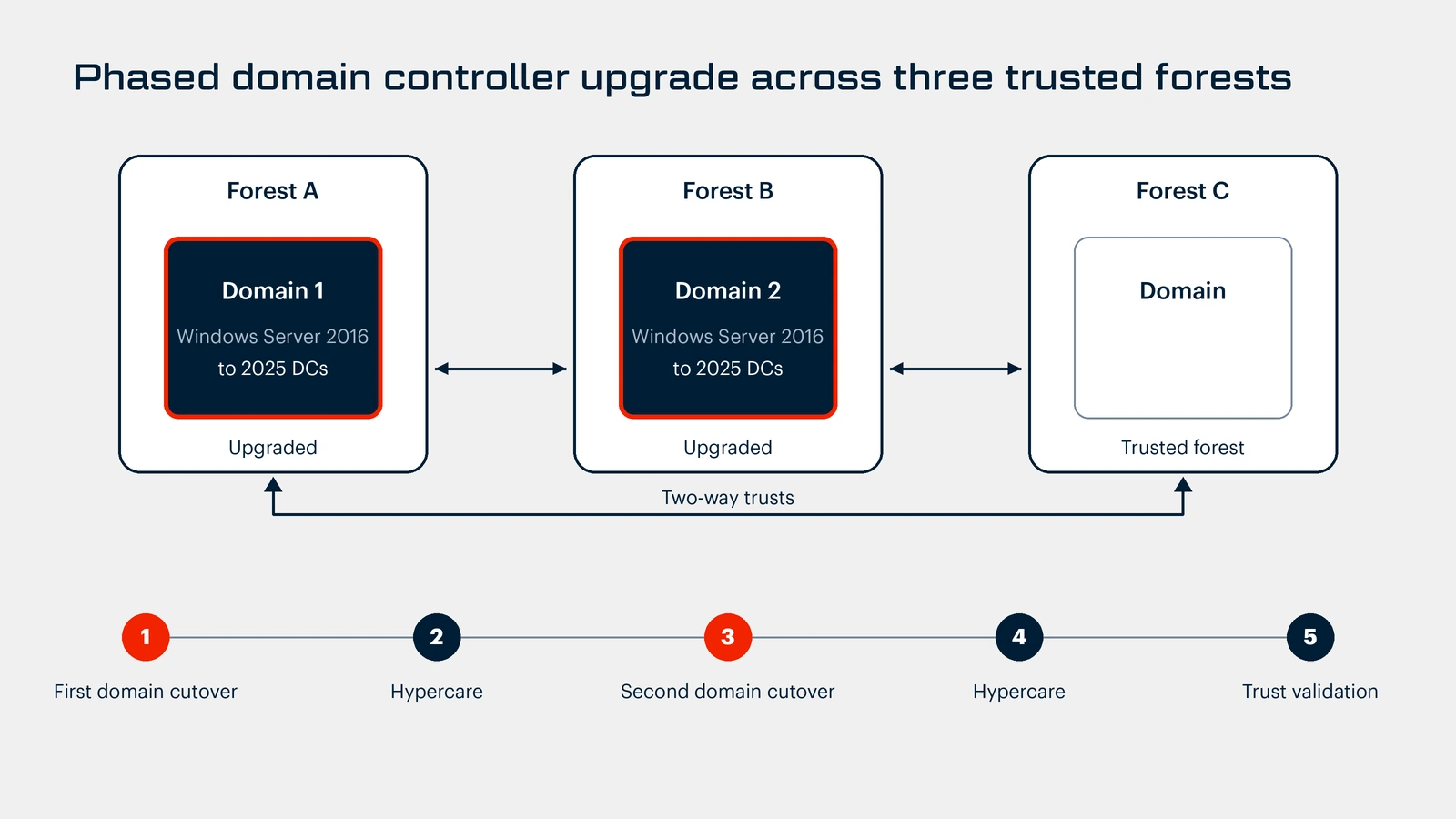
The two domains sit in separate forests, and two-way trusts connect them to a third forest. The hard part was everything leaning on the domain controllers: user sign-in, internal applications, and the trusts between forests. The two domains ran at different functional levels, so one upgrade sequence would not fit both. Production access was audit-controlled, so every change had to be requested, approved, and carried out under the client's IT Operations supervision.
Windows Server 2025 domain controllers need the domain and forest to be at the Windows Server 2016 functional level or higher, so each domain's prerequisites were checked before anything was promoted.
Our approach
How the upgrade ran, phase by phase
BITSUMMIT ran the upgrade one domain at a time, so the first cutover could prove the method before the second began.
Discovery and design
A detailed questionnaire and a focused review workshop captured the current state: domain controllers and their roles, where the FSMO roles and the global catalog sat, DNS and DHCP, the trusts between all three forests, backup and monitoring tooling, and change-window limits. FSMO (Flexible Single Master Operations) roles are the special jobs only certain domain controllers hold, such as the PDC emulator and schema master. The global catalog is the directory index used for lookups across domains.
From that, BITSUMMIT produced the target design for each domain: where the new domain controllers sit, how the FSMO roles and the global catalog move, the cutover order, rollback steps, and the health checks that decide whether a step passed.
Readiness and hardening
The new Windows Server 2025 domain controllers were built from a standard template and hardened to a documented security baseline before promotion. Prerequisites on both existing domains, including the functional-level requirement, were checked before anything in production was touched.
First domain cutover
The new servers were promoted to domain controllers alongside the old ones. The FSMO roles and the global catalog moved to Windows Server 2025, and the trusts to the other two forests were confirmed working. Only then were the Windows Server 2016 domain controllers demoted and their metadata cleaned up. Application teams tested their own systems.
Hypercare after each cutover
During each 10-business-day hypercare window, we ran daily checks on replication, DNS, time sync, and event logs using standard Active Directory health checks.
Second domain cutover
The second domain followed the same pattern, using the runbook refined on the first, and got its own 10-business-day hypercare window.
Trust validation and handover
A structured validation tested authentication and resource access across all three forests, along with cross-forest name resolution. BITSUMMIT then delivered as-built documentation for both domains and ran two knowledge transfer workshops with IT Operations and Security.
The outcome
What the client has now
- Two domains on supported domain controllers. Both Active Directory domains now run on Windows Server 2025 domain controllers, and the Windows Server 2016 domain controllers are retired.
- Trusts validated across all three forests. Cross-forest authentication and name resolution were tested after the upgrade, not assumed.
- Hardening built in. The new domain controllers were hardened to a documented security baseline from day one.
- A team that can run it. As-built documentation, per-domain runbooks, and two knowledge transfer workshops leave the client's IT Operations and Security teams owning the environment.
Planning a similar upgrade
- Upgrade one domain at a time, so the first cutover proves the method before the second begins.
- Validate trusts and cross-forest name resolution after every cutover, not just at the end.
- Move the FSMO roles and the global catalog, and confirm trusts, before you demote the old domain controllers.
- Plan a hypercare window for each domain, with daily checks, so issues surface early.
- Build audit-controlled change approval into the plan, so every production change is requested and approved before the window opens.
The same discipline applies further up the identity stack. See how we rescued an undocumented PKI from Windows Server 2008, or how another client retired on-premises Active Directory and went cloud-only. More on our hybrid infrastructure work.
Still running domain controllers on Windows Server 2016? Book an Active Directory review. We'll look at your domain controllers, trusts, and dependencies with you and map a safe upgrade path.